n-Track Studio DAW: Make Music
- 4.1
- Rating
- 10.00M
- Installs
- Free
- Price
 Analysis by App-foxy
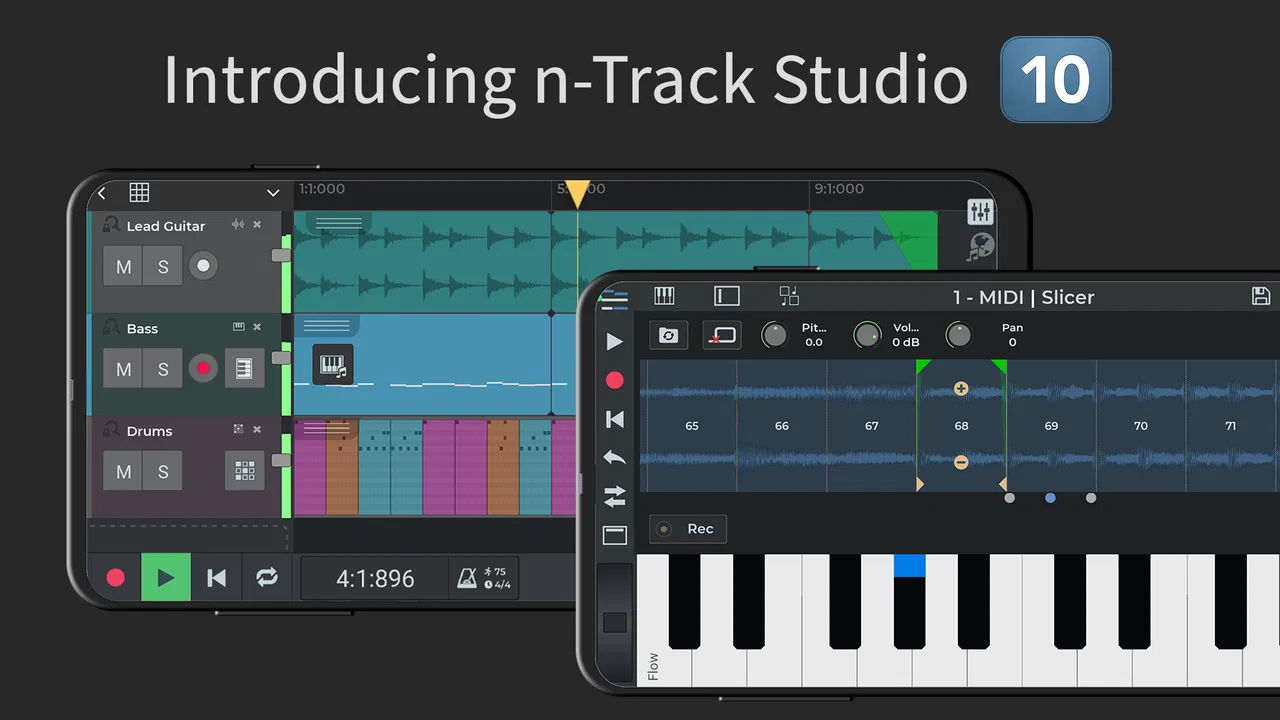
I approached n-Track Studio DAW: Make Music as a practical mobile recording tool rather than a toy for making quick loops. It is a free Music & Audio app from n-Track, and its idea is straightforward: turn an Android phone or tablet into a compact place for recording, arranging, mixing, and polishing music. I found that promise appealing because it covers several jobs in one workspace, but it also creates a learning curve that simpler beat-making apps avoid.
The app is suitable for Everyone, runs on Android 6.0 or later, and has built a substantial audience, with over 10 million installs. Its average rating sits at 4.1 from around 66 thousand ratings, which suggests a generally positive experience with enough variation to remind me that a mobile DAW will not feel equally comfortable on every device or for every workflow. The developer is n-Track, and the current version is 10.5.185.
My overall impression is that this is best understood as a serious sketchbook for musicians, podcasters, singers, and guitar players who want more control than a basic voice recorder provides. It can be surprisingly capable when I keep a project organized and work within the limits of my phone. It is less convincing as a complete replacement for a desktop studio, especially when a session grows crowded or when I need the fastest possible path from an idea to a finished track.
You May Also Like

 Blood Strike: 2.5 Anniversary
Blood Strike’s Loadouts Turn Every Drop Into a Tactical Gamble
A close look at Blood Strike’s custom loadouts: how fast access to signature weapons reshapes its battle royale rhythm, rewards preparation, and narrows the gap between fights.

 Pandora - Music & Podcasts
Pandora’s Music Is Easy to Start, but Harder to Recover
Pandora’s strength is its low-effort path from a seed to a station. Its weak spot is how much confidence it asks you to place in connection, setup, and quiet recovery.

 8 Ball Pool
 Is Built on Rivalries, Rematches, and Routine
A close look at the rivalries, rematches, shared routines, and unanswered safety questions that turn a quick pool match into a persistent mobile community.

 Samsung Music
’s Quiet Strength Is Playing What You Already Own
Its reach comes less from spectacle than from dependable access to a personal library. That simplicity is both the app’s strongest retention engine and its ceiling.

 AccuWeather: Weather Radar
AccuWeather Review: A Quick, Clear Forecast for Everyday Decisions
For everyday plans, the best forecast is the one you can understand quickly. AccuWeather makes rain timing, radar, and local conditions easy to act on, with a few trade-offs.

 Hill Climb Racing
Why Hill Climb Racing Still Turns Crashes Into One More Run
A tiny car, a bumpy hill and one more upgrade: Hill Climb Racing keeps resurfacing because its simple chaos makes every near-miss feel personal.
More From Our News Desk
View All News


How quickly can a mobile recording session get moving?
The first useful distinction is between opening the app and being ready to work. A simple recorder usually wins the first few minutes because its entire purpose is capturing one sound. n-Track Studio asks me to think in terms of a project, tracks, instruments, effects, and a mix. That extra structure takes longer to understand, but it pays off once I want to record several parts instead of one uninterrupted performance.
For a singer-songwriter, the natural starting point is a rough guitar or vocal take. I can establish that first part, listen back, and build around it rather than trying to perform everything perfectly in one pass. This makes the app useful for ideas that arrive away from a computer. I would not call the experience instant, but it is much more flexible than recording a memo and hoping to reconstruct the arrangement later.
The interface rewards preparation. Before recording, I would decide whether I am capturing a complete performance, layering a new part, or experimenting with a beat. Naming tracks clearly and keeping the arrangement tidy matters because mobile screens offer less room for visual organization than a desktop monitor. Those small habits improve perceived speed more than repeatedly searching for controls after the project becomes busy.
The quickest workflow is not the one with the fewest buttons; it is the one that keeps the session simple until the musical idea is safe. I prefer recording a clean foundation first, then adding detail in separate passes. That approach reduces confusion and makes it easier to recover if an experimental layer does not work.
Recording voice, guitar, and podcasts
Voice recording is one of the most approachable uses. A spoken introduction, interview segment, or podcast idea can begin with a direct take and then receive editing and mixing attention afterward. For a podcast, I would use separate tracks for the host, guest, music, and any short transition elements. That arrangement gives me more control than a single-file recorder, particularly when one voice needs different treatment from another.
Guitarists can use the same layered method: record a rhythm part, add a lead line, and leave space for vocals. The important trade-off is monitoring. A phone microphone and built-in speaker are convenient, but they are not a substitute for a quiet room and proper headphones. If I hear delay while monitoring, or if the room adds too much echo, the app cannot magically repair the recording later.
I would also avoid judging a mix through only the phone speaker. Small speakers can make a vocal seem clear while hiding muddy low frequencies or an overly bright effect. Checking with headphones, then listening again on the phone, gives a more realistic idea of whether the result will survive outside the project.
What happens when a project becomes demanding?
The app is most comfortable when I treat it as a focused mobile session rather than an unlimited studio. A short arrangement with a few carefully chosen parts is easier to navigate and less demanding than a dense production containing many simultaneous tracks and effects. As a project grows, editing takes more attention, and the phone has more work to do when playing everything together.
This is where the difference between a sketch and a full production becomes important. A rough song idea may feel quick and responsive, while a heavily layered mix can make every action feel more deliberate. I would not interpret that as a flaw unique to n-Track Studio; mobile hardware, screen size, audio routing, and the complexity of the session all influence the experience. Still, anyone expecting a desktop-style session with no compromises should adjust expectations.
One useful habit is to finish creative decisions in stages. I would record and edit the core performance first, remove unused takes, and only then add extra effects. Keeping every abandoned experiment active makes playback and navigation harder without improving the song. A tidy project is not just easier to read; it also reduces the amount of unnecessary processing the device must handle.
Another practical trade-off concerns effects. Adding processing while recording can help me perform into a particular sound, but it can also make monitoring more complicated. For a beginner, I would capture a clean signal whenever possible and shape it during mixing. That leaves room to change my mind. If the effect is essential to the performance, I would test it briefly before committing to a complete take.
Stability and recovering from a bad session
Reliability in a mobile DAW is not only about whether the app opens. It is also about whether I can return to a project, understand its layout, and continue without losing the thread of the session. n-Track Studio benefits from a track-based structure because I can separate parts and revisit them individually. That is more recoverable than having one long recording where a mistake forces me to repeat everything.
I would still work defensively. Saving at natural milestones, keeping a useful project name, and avoiding a last-minute pile of changes are sensible habits for any audio application. They are especially valuable on a phone, where calls, notifications, low battery, or an accidental app switch can interrupt concentration. The app can organize a recording project, but it cannot remove the everyday interruptions that come with mobile work.
Recovery is also easier when the arrangement is understandable. If I label a track according to its role instead of leaving several unnamed recordings, I can quickly identify what needs replacing. This becomes important during podcast editing, where a single awkward sentence may need a new take without disturbing the music bed or the rest of the conversation.
I found the app more dependable as a controlled recorder and mixer than as a place for careless experimentation. That is not a criticism of its purpose. It simply means that stability is partly a workflow decision: fewer unnecessary layers, sensible effect choices, and regular saves make the whole experience feel safer.
Phone limits, Android versions, and resource decisions
Because the minimum operating system is Android 6.0, the app is available to people using a wide range of Android devices. Compatibility, however, should not be confused with identical performance. An older phone may run the app while still feeling less comfortable with a large project than a newer device. Screen size, available storage, memory, audio hardware, and the number of active processes can all affect how pleasant recording becomes.
I would choose a quiet, uncluttered device for an important session. Closing unrelated apps, keeping the phone charged, and leaving room for project files are simple steps that protect the workflow. They do not turn modest hardware into a studio computer, but they reduce avoidable interruptions. A tablet can also be easier for arranging tracks because the larger display gives the timeline and controls more breathing space.
Headphones are particularly important when recording through a phone. They help prevent the backing track from leaking into the microphone, and they make it easier to notice timing or monitoring problems. If I am recording vocals with the phone’s built-in microphone, I would pay close attention to distance and room noise. The app can mix and process what I capture, but the quality of the original recording still sets the ceiling.
The free price makes it easy to test the workflow before spending anything. There are in-app purchases ranging from $0.99 to $34.99 per item, so I would first decide whether the basic experience fits my needs and only then consider optional purchases. This is a sensible approach for beginners: learn whether the track-based environment suits you before treating extra content or tools as necessary.
Where it beats simpler alternatives
Compared with a standard voice recorder, n-Track Studio is far more useful for building a complete idea. A recorder is excellent when I need to preserve a thought immediately, but it gives me little help when I want to combine vocals, guitar, beats, and background music into a deliberate arrangement. Here, the separation into tracks makes revision possible.
Compared with a lightweight beat-making app, it also feels more appropriate for musicians who begin with a real performance. Someone who plays guitar or sings may prefer laying down an organic part first instead of constructing the entire song from loops. The app can serve as a bridge between a quick demo and a more developed production, provided I accept the extra setup.
The comparison changes when I place it beside a desktop DAW. A computer offers a larger workspace, more comfortable editing, and usually a stronger environment for long, complicated sessions. I would choose desktop software for detailed mixing, extensive automation, or a project that has already outgrown the phone. n-Track Studio makes more sense when portability matters more than maximum control.
It is also not the ideal choice for someone who wants a one-tap result. If my priority is an extremely simple recording process, a dedicated recorder may be less frustrating. If my priority is instant loop creation, a specialized beat app may feel more direct. This app earns its place when I want several stages—recording, arranging, mixing, and mastering—in one mobile workspace.
Everyday scenarios where the app earns its place
Imagine I am on a train and hear a chorus in my head. I can record a vocal guide, add a basic rhythmic idea, and preserve the structure before the thought disappears. Later, I can replace the rough vocal, add guitar, and balance the parts. The value is not that the phone produces a perfect master immediately; it is that the musical idea remains editable instead of being trapped in a disposable memo.
For a small podcast, I would record the main voices separately when possible, place music on its own track, and lower the music beneath speech rather than baking everything into one recording. That makes corrections less painful. If an introduction is too loud, I can adjust it without forcing the entire episode to be recorded again.
A guitarist preparing for rehearsal could record a chord progression, add a lead idea, and use the result as a personal reference. A vocalist could test harmonies without asking another person to manage a computer. A student could compare several arrangements of the same melody. These are modest projects, but they match the app’s strongest quality: it gives mobile ideas enough structure to develop.
For live or important work, I would be more cautious. A phone is easy to carry, but it is also easy to bump, interrupt, or overload with unrelated tasks. I would use the app for preparation and portable production, then move to a larger setup when the recording needs maximum consistency and detailed finishing.
Who should install it, and who should skip it?
I recommend trying it if you sing, play guitar, make demos, produce podcasts, or want to learn how multitrack recording works without starting with a computer. The free entry point is helpful, and the broad age rating makes it approachable for beginners. The app has enough depth to remain useful after the first experiment, especially if you enjoy shaping a project rather than pressing record and stopping there.
I would skip it if you dislike menus, have no patience for organizing tracks, or only need a quick voice note. I would also choose a desktop DAW for serious long-form production where screen space, detailed editing, and a larger hardware setup matter more than portability. The app is not a shortcut around learning audio basics; it is a portable place to apply them.
New users should begin with one voice or instrument, one supporting part, and a simple mix. That small project reveals whether the controls make sense without burying the user in options. Once the basic recording and playback routine feels comfortable, adding beats, effects, and more tracks becomes much less intimidating.
My performance verdict
After using it as a mobile studio, I see n-Track Studio as a capable compromise rather than a miracle workstation. Its speed is good for focused ideas, but heavy sessions naturally demand more care. Its reliability improves when I save sensibly and keep projects organized. Its resource demands depend heavily on the device and arrangement, so I would not promise the same experience on every Android phone.
The strongest reason to choose it is the combination of portability and control. I can move from a raw recording to a structured mix without changing applications, and that continuity is valuable. The weakest point is the friction that appears when I ask a small touchscreen device to behave like a full desktop studio.
The app is free to start, supports Android 6.0 and later, and offers optional in-app purchases from $0.99 to $34.99 per item. With a current version of 10.5.185 and a large installed user base, it is an established option rather than an obscure experiment. I would still test it on my own device with a small project before committing to a major production.
My recommendation is clear: use it as a portable songwriting desk, multitrack recorder, and practical podcast workspace. Keep the first sessions lean, monitor with headphones, save at sensible points, and do not mistake mobile convenience for unlimited studio power. If that balance suits the way you make music, n-Track Studio DAW: Make Music can turn spare moments into genuinely workable recordings.
FAQs for n-Track Studio DAW: Make Music
01What is n-Track Studio DAW: Make Music used for?
n-Track Studio DAW: Make Music is a mobile digital audio workstation for creating, recording, editing, and mixing music. After testing its workflow, I found it suitable for recording vocals, guitars, keyboards, and other instruments, as well as arranging loops and MIDI parts. It is designed for beginners, songwriters, and more experienced musicians who want a portable studio on Android or iOS.
02Can I record vocals and instruments with n-Track Studio?
Yes, the app supports recording vocals and live instruments through a device microphone or a compatible external audio interface. You can build projects with multiple tracks, adjust levels, apply effects, and edit recordings afterward. However, recording quality depends heavily on your phone or tablet, microphone, adapters, and room acoustics, so professional results may require additional equipment.
03Does n-Track Studio include effects, instruments, and loops?
n-Track Studio includes a selection of virtual instruments, audio effects, drum patterns, loops, and tools for shaping a mix. These features make it possible to start producing without collecting separate applications. The exact content and availability can vary according to the platform and subscription or purchase plan, so users should check which instruments, effects, and sound libraries are included before downloading.
04Is n-Track Studio free to use, or does it require payment?
The application can generally be downloaded and tried without an initial purchase, but some advanced features, effects, instruments, exports, or project capabilities may be restricted behind in-app purchases or a subscription. Before committing to a serious project, review the current pricing and plan details shown in the Google Play Store or Apple App Store, since available options can change over time.
05Is n-Track Studio suitable for beginners?
n-Track Studio can be a good starting point for beginners because it combines recording, MIDI, loops, effects, mixing, and exporting in one application. The interface may still feel busy at first, especially when using automation, routing, or detailed audio editing. New users should begin with a simple multi-track project and gradually explore the tutorials, menus, and mixing controls.
Pros
- Full multitrack recording with audio and MIDI support.
- Built-in effects
- instruments
- and loop libraries aid music production.
- Supports external microphones and audio interfaces on compatible devices.
- Useful mixing tools include automation
- equalization
- and reverb.
- Projects can be exported in several common audio formats.
Cons
- Advanced features and effects require a paid subscription or purchases.
- The interface can feel crowded on smaller phone screens.
- Large projects may consume significant storage and battery power.
- Latency can occur with some devices
- microphones
- or Bluetooth headphones.
- Learning the full workflow may take time for beginners.

n-Track Studio DAW: Make Music
Gallery